Availability Scheduling
Make an item appear only on specific days and times — for example breakfast from 8 to 11 in the morning, or a weekend special. Outside this window the item disappears completely from the cashier screen and the customer menu, without deleting it.
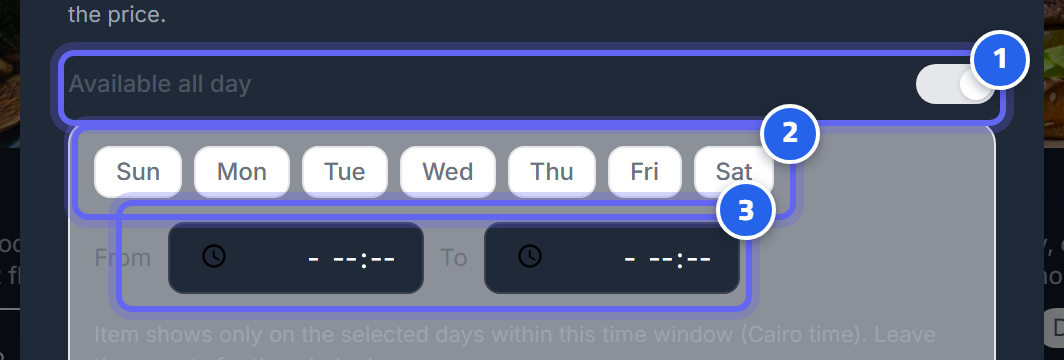
- Turn off "available all day" to schedule
- Choose the days of availability
- Set the available hours (from/to — in Cairo time)
How to schedule an item
- Open the admin panel → Menu, and open the item you want to schedule.
- You'll find the available all day toggle on by default — turn it off so the scheduling field appears.
- Set the days by tapping the day buttons (you can choose more than one day).
- Set the time in the from and to fields.
- Save the item.
Day map
Days are numbered from Sunday to Saturday:
| Number | 0 | 1 | 2 | 3 | 4 | 5 | 6 |
|---|---|---|---|---|---|---|---|
| Day | Sun | Mon | Tue | Wed | Thu | Fri | Sat |
Scheduling states
| Setting | Result |
|---|---|
| Available all day on | The item is always visible |
| Specific days + specific time | Shows on those days during that time only |
| Days without a time | Shows all day on the selected days |
| Time without days | Shows every day during the set time |
💡 Tip: If you create a window that crosses midnight (for example 22:00 to 02:00), the system understands it correctly and continues it until early morning on the start day.
Cairo time
All schedules are calculated in Cairo time (Africa/Cairo), not the time of the cashier's or customer's device. This means breakfast hours start and end exactly on your restaurant's time.
The difference from "out of stock"
Scheduling is one thing and out of stock is another: - Scheduling turns the item on and off automatically based on the time and day. - Out of stock is a manual decision you make when an ingredient runs out, and it stays hidden until you bring it back by hand.
⚠️ Warning: If the item is outside its availability window, you won't find it on the cashier screen or in the customer menu. This is normal and not a fault.
Next: Recipes and Costing