Cash payments and change
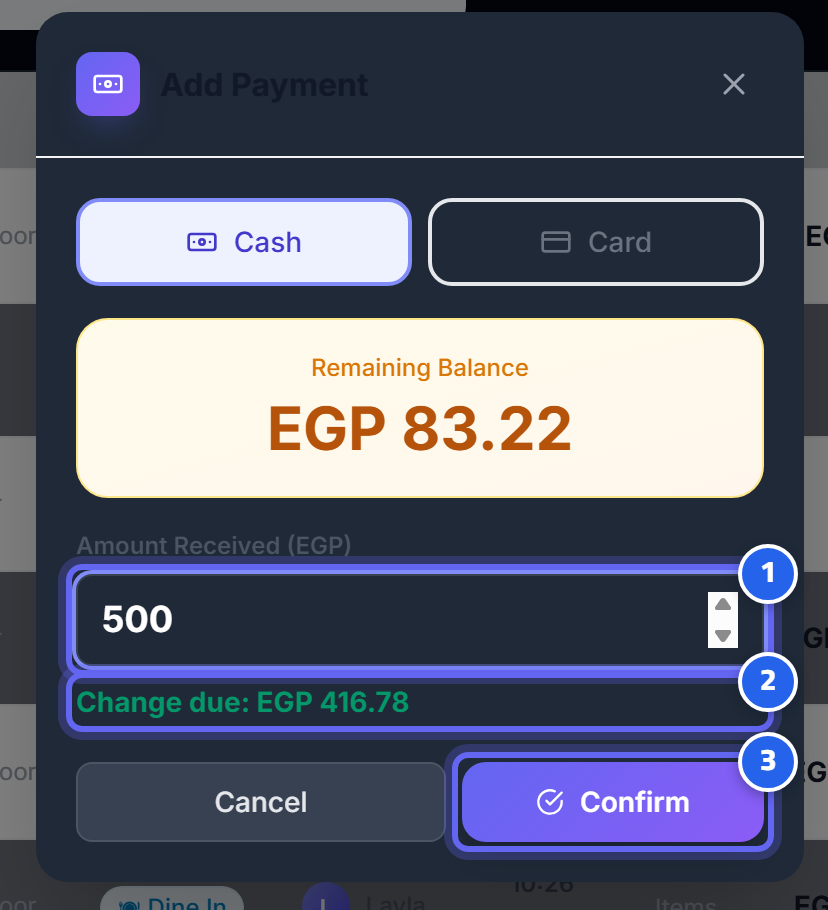
- Enter the amount received from the guest
- The change is calculated automatically
- Confirm to close the order
Steps
- Open the order → Pay → select Cash.
- Enter the amount received from the guest.
- The system charges only what's due and calculates the change if the guest paid more.
- Confirm → the order closes (or stays "partial" if the payment is less than the total).
Change
If the amount received is greater than what's due, the system shows the change to give back to the guest — and it does not count the change as revenue.
Partial payment
You can accept a partial payment; the order stays "partial" until it's completed. (Useful for splitting payment between guests.)
Safety
Even if multiple payment requests arrive at the same instant, the system never charges more than the bill — collection is protected against duplication.
Next: Card / QR