Card / QR payment at the table
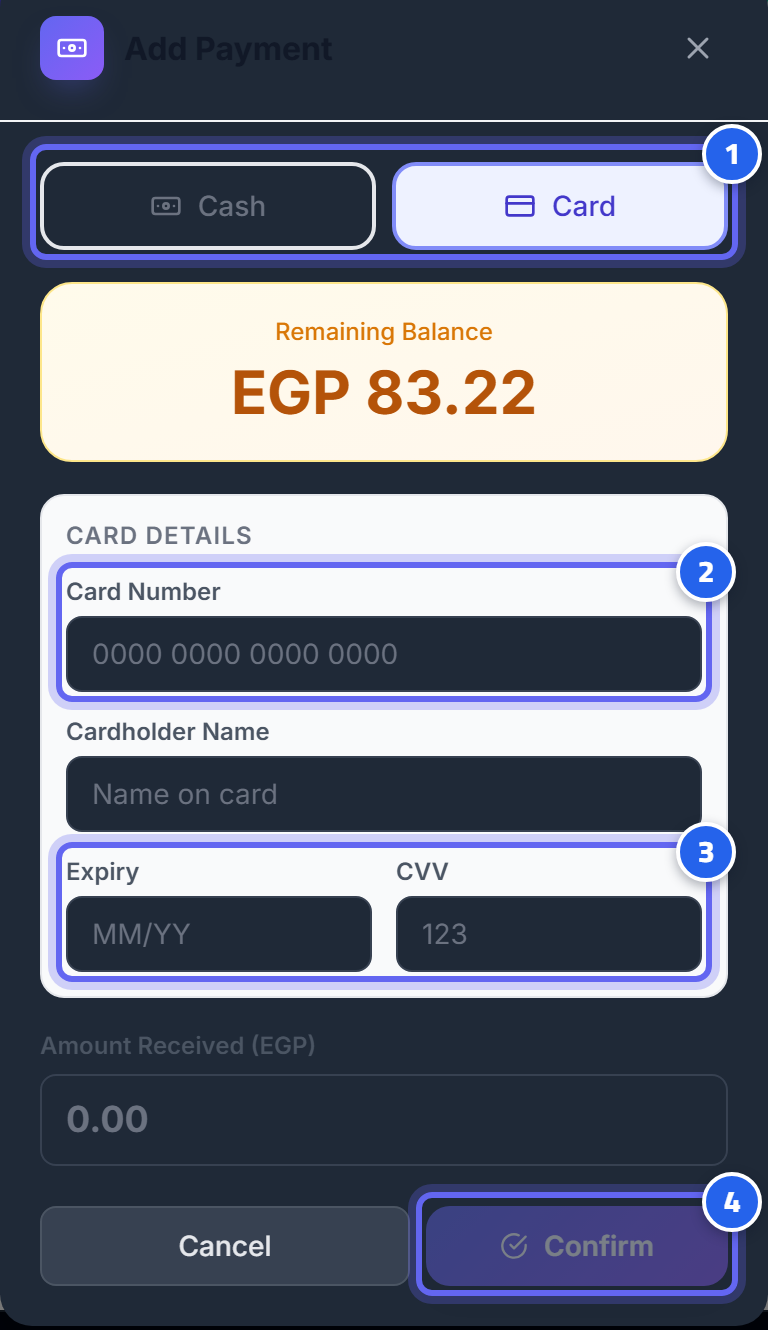
- Select "Card" as the payment method
- Enter the card number and cardholder name
- Expiry date and CVV
- Tap "Confirm" to complete the payment
By card (at the cashier)
Open the order → Pay → Card → payment is processed through the QNB gateway. As soon as the gateway confirms, the order closes and the receipt is sent.
QR at the table (the guest pays themselves)
The guest scans the table QR code with their phone → views their bill → pays from the phone (a secure payment page). The order closes automatically as soon as the payment is confirmed.
Secure and reliable
- The real confirmation comes from the gateway to the server — not from the customer's device — so a fake "successful payment" is impossible.
- The customer's card never passes through your system (payment happens on the bank's page), and we keep only the last 4 digits and the card type — in line with card security standards (PCI).
⚠️ Note: the card payment path (QNB/MPGS) is currently in trial — rely on cash for real operation until it's officially enabled (enabling it is the operator's responsibility, not done from the restaurant dashboard).